Integrating Procreate Textured Art Brushes into a Professional Digital Workflow
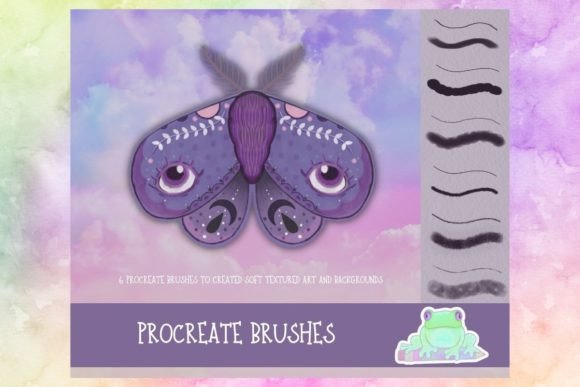
In the evolving landscape of digital illustration, the gap between traditional media and screen-based creation continues to narrow. For professionals ranging from freelance illustrators to marketing designers, the authenticity of texture often determines the emotional resonance of a piece. Procreate Textured Art Brushes serve as a critical bridge in this context, allowing creators to replicate the tactile qualities of physical materials without the logistical constraints of paint, paper, or cleanup. Specifically, utilizing a curated set of six textured art brushes designed for soft pencil and pastel styles can transform flat digital sketches into rich, dimensional artworks suitable for high-end product photography and commercial assets.
Understanding how to integrate these tools into a broader creative process requires more than just downloading a file. It demands a shift in how one approaches layering, blending, and final output. This article explores the practical implementation of these brushes, focusing on workflow efficiency, consistency, and the strategic use of texture to enhance visual communication.
The Role of Texture in Modern Digital Design
Texture is not merely an aesthetic add-on; it is a functional element that guides the viewer’s eye and establishes mood. In commercial applications, such as creating art for product photos or branding materials, sterile digital lines can sometimes feel cold or impersonal. By introducing the grain of charcoal or the softness of pastel, designers inject warmth and humanity into their work. This is where a specialized brush set becomes invaluable. Unlike generic round brushes, Procreate Textured Art Brushes are engineered to mimic the irregularities of natural media, providing a level of organic variation that is difficult to achieve manually.
When planning a project, consider texture as part of the initial brief rather than an afterthought. If the goal is to create an image that feels handcrafted, the choice of tools must align with that objective from the start. A set of six distinct brushes offers enough variety to handle different stages of the drawing process—sketching, shading, highlighting, and refining—without overwhelming the artist with decision fatigue. This balance between variety and simplicity is crucial for maintaining momentum during tight deadlines.
Preparation and Setup for Consistent Results
Before beginning any illustration, proper setup ensures that the brushes perform predictably. Importing the brush set into Procreate is straightforward, but optimizing your canvas settings is equally important. High-resolution canvases allow the texture details within the brushes to render clearly, which is essential if the final output will be used in print or large-format displays. For digital-only products, standard resolution may suffice, but keeping scalability in mind prevents quality loss later in the pipeline.
- Canvas Dimensions: Start with a canvas size that matches your final output requirements to avoid resizing artifacts.
- Color Profile: Use sRGB for web-based product photos and CMYK-compatible profiles if printing is involved.
- Brush Settings: Test each of the six brushes on a scratch layer to understand their pressure sensitivity and opacity flow.
Organization is key to a smooth workflow. Create a dedicated brush group for these textured tools so they are always accessible. This reduces the time spent searching through menus and keeps the interface clean. Additionally, saving custom color palettes that complement the pastel and pencil aesthetics can streamline the coloring process, ensuring harmony between the texture and the hue.
Implementing the Brushes in the Creative Process
The true value of Procreate Textured Art Brushes emerges during the execution phase. A typical workflow might begin with a loose sketch using the softest pencil brush in the set. This initial layer should focus on composition and form rather than detail. Because these brushes mimic real graphite, they allow for easy erasing and reworking, encouraging experimentation without the fear of permanent mistakes.
As the piece progresses, switch to the heavier textured brushes for shading and depth. The interplay between light and shadow is where pastel-style brushes shine. By building up layers gradually, you can achieve a luminous quality that mimics traditional chalk on toned paper. This technique is particularly effective for creating product mockups where the item needs to stand out against a softly textured background. The contrast between the sharp edges of the product and the organic background draws attention to the subject while maintaining a cohesive artistic style.
During the detailing phase, use the finer brushes in the set to add intricate textures. These might include the grain of fabric, the roughness of stone, or the subtle imperfections of hand-drawn lettering. The key is subtlety; over-texturing can clutter the image and distract from the main message. Regularly zoom out to assess the overall balance, ensuring that the texture enhances rather than overwhelms the composition.
Integration with Other Tools and Assets
Digital illustration rarely exists in a vacuum. Procreate Textured Art Brushes interact seamlessly with other elements of a designer’s toolkit. For instance, combining these brushes with photo overlays can create hybrid images that blend realism with artistic interpretation. Import a photograph of a product, lower its opacity, and trace over it with the pastel brushes to create a stylized advertisement. This method saves time while delivering a unique visual identity that stands out in crowded social media feeds.
Furthermore, these brushes can be used in conjunction with vector software like Adobe Illustrator. After completing a textured illustration in Procreate, export it as a high-resolution PNG with a transparent background. Import this asset into Illustrator to combine it with crisp typography and vector shapes. This hybrid approach leverages the strengths of both raster and vector formats, resulting in professional-grade marketing materials that are both visually engaging and technically versatile.
Quality Control and Long-Term Usability
Maintaining consistency across multiple projects is a challenge for any creator. To ensure that your use of Procreate Textured Art Brushes remains consistent, develop a standard operating procedure. Document the specific settings you prefer for each brush, such as pressure curve adjustments or streamlining values. Save these as defaults or share them with team members if working in a collaborative environment. This standardization helps maintain brand integrity, especially when multiple artists contribute to a single campaign.
Regularly review your finished works to identify areas for improvement. Ask yourself whether the texture served the narrative or if it was applied arbitrarily. Over time, you will develop an intuition for when to use heavy texture versus when to keep things clean. This discernment is what separates amateur attempts from professional execution. Additionally, keep your software updated to ensure compatibility with the latest Procreate features, which may enhance the performance of complex brush engines.
Practical Applications for Entrepreneurs and Marketers
For small business owners and marketers, the ability to produce high-quality visuals in-house is a significant cost saver. Using a set of six textured art brushes allows for the rapid creation of social media graphics, email headers, and packaging designs that feel bespoke and authentic. Instead of relying on stock photos that everyone else uses, you can generate unique assets that reflect your brand’s personality.
Consider creating a series of product photos where the background is rendered using these pastel brushes. This approach adds depth and interest without distracting from the product itself. It also allows for easy customization; changing the background color or texture intensity can refresh the look of a product line without requiring a new photoshoot. This flexibility is invaluable for agile businesses that need to adapt quickly to market trends.
In conclusion, integrating Procreate Textured Art Brushes into your workflow is not just about adopting a new tool; it is about embracing a methodology that values texture, depth, and authenticity. By understanding the preparation, execution, and integration phases, you can leverage these brushes to elevate your digital art and commercial projects. Whether you are a seasoned illustrator or a marketer looking to enhance your visual content, mastering these tools offers a pathway to more engaging and effective communication.