Integrating Canvas Texture Procreate Brushes into Your Digital Art Workflow
The transition from traditional media to digital illustration often leaves artists searching for the tactile authenticity of physical materials. While tablets offer unparalleled convenience and undo capabilities, they can sometimes feel sterile or overly smooth. This is where specialized tools like Canvas Texture Procreate Brushes become essential components of a professional digital toolkit. These assets are not merely decorative overlays; they are functional instruments designed to replicate the resistance, grain, and organic imperfection of painting on real fabric.
For professionals, educators, and hobbyists alike, understanding how to integrate these textures into a broader creative process can significantly elevate the quality of final outputs. Whether you are creating marketing visuals, illustrating children’s books, or developing concept art, the right texture bridge the gap between digital precision and human touch.
Understanding the Toolset and Compatibility
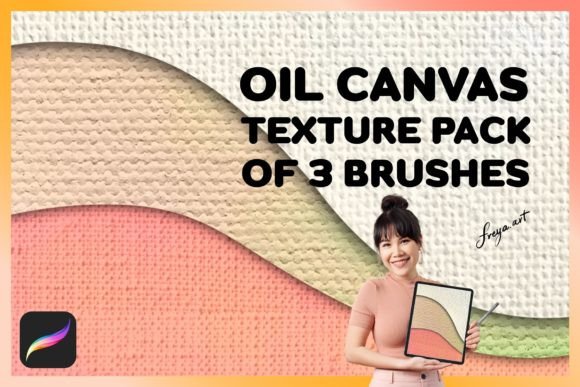
Before implementing any new asset into your workflow, it is crucial to understand its technical constraints and optimal usage environment. The Set of 3 Procreate Oil Canvas Texture Brushes is specifically engineered for the Procreate application on iPad. It is important to note that these brushes do not function in other software ecosystems such as Adobe Photoshop, Clip Studio Paint, or desktop-based applications. This specificity ensures that the brush engine leverages Procreate’s unique rendering capabilities, but it also requires users to commit to the iPad ecosystem for this part of their production pipeline.
Furthermore, the efficacy of these brushes relies heavily on hardware interaction. They work best when used with an Apple Pencil, as the algorithm interprets the varying degrees of pressure applied during strokes. Light touches produce subtle, airy marks, while heavier pressure deposits denser pigment with pronounced texture. For entrepreneurs and freelancers managing tight deadlines, recognizing this dependency prevents frustration and ensures that the tool performs as intended from the first stroke.
Preparation and Setup for Efficient Execution
Successful integration begins before you even open a new canvas. Upon purchasing the Canvas Texture Procreate Brushes, you receive an instant download. This immediacy allows for rapid deployment into active projects. However, rushing into creation without proper setup can lead to disorganization later. Take a moment to import the brush set into a dedicated folder within your Procreate brush library. Labeling this folder clearly—for example, "Textures - Oil Canvas"—ensures that you can locate these tools quickly during complex projects involving multiple brush sets.
Consider the resolution of your canvas. Textures behave differently depending on pixel density. A high-resolution canvas (300 DPI or higher) will capture the fine details of the canvas grain, making it ideal for print-ready work such as posters, book covers, or high-end marketing materials. Conversely, lower resolutions may cause the texture to appear blocky or lost. Establishing a standard canvas size and resolution for your typical deliverables helps maintain consistency across your portfolio.
Strategic Implementation in the Creative Process
The utility of oil canvas textures extends across various stages of the artistic workflow. Understanding when to apply them can streamline your process and enhance visual depth.
Foundation and Underpainting
One effective method is using the canvas texture during the initial blocking phase. Instead of starting on a stark white background, use one of the three included brushes to lay down a neutral, textured base. This mimics the traditional technique of toning a canvas. By establishing a textured ground early, subsequent layers of color interact more naturally with the surface. This approach is particularly useful for painters who struggle with the "digital look" of flat colors. The texture provides immediate visual interest and helps guide brush placement, encouraging looser, more expressive strokes.
Mid-Process Detailing and Blending
During the main rendering phase, the Set of 3 Procreate Oil Canvas Texture Brushes can serve dual purposes. Use the brushes not just for adding color, but for blending existing layers. The texture inherent in the brush tip breaks up hard edges and softens transitions between colors, simulating the way oil paint mixes on a rough surface. This is invaluable for portrait artists or landscape painters seeking atmospheric depth. Because the brushes respond to pressure, you can control the intensity of the texture application, allowing for subtle variations that keep the viewer engaged.
Final Polish and Unification
In the final stages of a project, consistency is key. Digital artworks often suffer from disjointed elements where different parts look like they belong to different images. Applying a light pass of canvas texture over the entire composition can unify the piece. This technique acts as a visual glue, ensuring that foreground and background elements share the same material reality. For marketers and content creators, this level of polish distinguishes amateur graphics from professional-grade illustrations, enhancing brand perception and audience trust.
Workflow Integration for Professionals and Educators
For educators teaching digital art, these brushes provide an excellent opportunity to discuss the importance of materiality in digital spaces. Demonstrating how pressure sensitivity affects texture deposition helps students understand the relationship between input and output. It shifts the focus from merely clicking icons to physically engaging with the artwork.
Freelancers and small business owners can leverage these tools to speed up their delivery times without sacrificing quality. By having a reliable set of texture brushes that consistently perform well, you reduce the time spent experimenting with custom settings or searching for suitable overlays. The bonus canvas texture included in the set offers additional versatility, allowing for quick background generation or pattern creation. This efficiency translates directly to better profit margins and the ability to take on more clients.
Maintenance and Long-Term Use
Digital tools require maintenance just like physical ones. Over time, you may customize these brushes to suit your specific style. Procreate allows for deep customization of brush behavior. If you find the default texture too aggressive, adjust the grain scale or opacity. If it feels too subtle, increase the jitter or spacing. Saving these customized versions as new presets ensures you always have a fallback to the original settings if needed.
Organization remains critical as your library grows. Regularly audit your brush sets. Remove unused duplicates and ensure that your Canvas Texture Procreate Brushes remain easily accessible. For teams collaborating on projects, sharing standardized brush sets ensures that all contributors produce work with a consistent aesthetic. This is particularly important for agencies or publishers maintaining a cohesive visual identity across multiple illustrators.
Maximizing Value Through Practice
To truly master these tools, dedicate time to deliberate practice. Create a series of studies focusing solely on texture application. Experiment with different color palettes, lighting conditions, and subject matters. Observe how the oil canvas texture interacts with transparent layers versus opaque ones. Notice how it behaves when used with blending modes like Multiply or Overlay. These observations build an intuitive understanding of the tool, allowing you to make faster, more confident decisions during client work.
Remember that technology serves creativity, not the other way around. The Set of 3 Procreate Oil Canvas Texture Brushes is a means to an end: creating compelling, authentic, and emotionally resonant art. By integrating these brushes thoughtfully into your planning, execution, and review phases, you enhance both your workflow efficiency and the artistic quality of your output. Whether you are refining a personal project or delivering a commercial commission, the tactile depth provided by these tools can make the difference between a good image and a memorable one.
Ultimately, the value of these brushes lies in their ability to humanize digital art. In an era where AI-generated images and sterile vector graphics are commonplace, the organic irregularity of canvas texture signals hand-crafted care. For creators aiming to stand out, incorporating such nuanced details is a strategic advantage. It demonstrates attention to detail and a respect for traditional artistic principles, adapted for the modern digital age.