8 Oil Paint Brushes for Digital Painting: Transforming Your Digital Workflow
Digital art has come a long way from the sterile, vector-perfect lines of early graphic design software. Today, artists crave texture, imperfection, and the organic feel of traditional media. This is where the 8 Oil Paint Brushes for Digital Painting package becomes an essential tool in your creative arsenal. It is not just about mimicking oil paint; it is about capturing the soul of the medium—the viscosity, the blending capabilities, and the rich layering that defines classical painting—while retaining the flexibility and undo-button safety of digital creation.
Whether you are a seasoned illustrator looking to add depth to your character designs or a hobbyist wanting to create stunning wall art for your home, understanding how to leverage these specific brushes can elevate your work from flat digital images to textured masterpieces. The package includes a versatile Photoshop abr brush file, eight dedicated Paint Shop Pro psp files, and a transparent PNG image pack, ensuring compatibility across various platforms and workflows.
Bridging the Gap Between Traditional and Digital
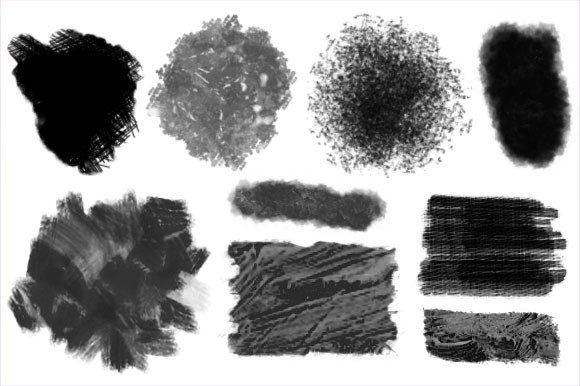
The primary appeal of this brush set lies in its ability to replicate the physical resistance and flow of real oil paints. When you use standard digital brushes, the stroke often feels uniform and predictable. In contrast, these oil paint brushes introduce variable opacity, texture mapping, and pressure sensitivity that mimic the drag of bristles against canvas. For artists transitioning from traditional oils to digital tablets, this familiarity reduces the learning curve significantly. You do not have to relearn how to blend colors or build up layers; you simply apply your existing knowledge to a new interface.
Consider the scenario of a concept artist working on environment designs for a video game. They need to convey mood and atmosphere quickly. Using the thicker, impasto-style brushes from this set, they can block in large shapes with visible texture, suggesting rough stone, dense foliage, or weathered wood without getting bogged down in minute details. The transparency of the PNG assets included allows for quick overlay effects, adding instant grain or canvas texture to a flat color base, which helps stakeholders visualize the final rendered look much earlier in the production pipeline.
Practical Applications Across Industries
The utility of these brushes extends far beyond fine art reproduction. Different industries and creative roles can harness these tools in unique ways:
- Graphic Design and Branding: Modern branding often leans towards authenticity and handcrafted aesthetics. A logo or promotional graphic created with digital oil brushes feels more human and approachable than one made with sharp geometric tools. Designers can use the softer edges of these brushes to create watercolor-like backgrounds or textured typography that stands out in a sea of minimalism.
- Fashion and Textile Design: When creating patterns for t-shirts or fabrics, the repeatable nature of digital assets is crucial. The included transparent PNGs allow designers to scatter brush strokes seamlessly across a textile pattern. The organic variation in the oil brush strokes ensures that the printed fabric does not look mechanically repetitive, adding a premium, artisanal quality to apparel.
- Sticker and Merchandise Creation: Sticker artists thrive on bold, expressive lines. The thick, buttery consistency simulated by these brushes is perfect for creating standout characters or quotes. Because the output is digital, artists can easily isolate their subjects using the transparent PNGs, making it simple to prepare files for print-on-demand services without spending hours on manual cutouts.
Enhancing Personal Projects and Home Decor
For individuals interested in decorating their living spaces, this toolset offers a cost-effective alternative to commissioning original paintings. You can create large-scale digital artworks that mimic the texture of expensive oil canvases. Imagine creating a serene landscape for your bedroom or a vibrant abstract piece for your living room. By using the high-resolution PNG textures included in the pack, you can print these designs on canvas wraps, metal prints, or acrylic blocks. The result is a personalized decor item that carries the visual weight and sophistication of traditional art, tailored specifically to your color palette and spatial requirements.
Moreover, the emotional connection to self-created art is profound. The process of digitally "painting" allows for experimentation without the fear of ruining expensive materials. You can try bold color combinations, aggressive brushstrokes, or delicate glazes, knowing that every mistake is just a command-Z away. This freedom encourages creativity and often leads to more adventurous and personally meaningful pieces.
Technical Considerations and Best Practices
While the 8 Oil Paint Brushes for Digital Painting are powerful, they require a certain approach to yield the best results. First, consider your hardware. A pressure-sensitive tablet is highly recommended. These brushes are designed to respond to the pressure of your stylus; pressing harder creates thicker, more opaque strokes, while a light touch produces translucent glazes. Without pressure sensitivity, you may find the brushes feel flat and unresponsive, losing the nuanced behavior that makes them special.
Secondly, think about your workflow regarding file formats. The inclusion of both Photoshop abr files and Paint Shop Pro psp files indicates a commitment to accessibility. If you are a Photoshop user, installing the abr file will integrate these brushes directly into your brush preset panel. For Paint Shop Pro users, the dedicated psp files ensure that the dynamic properties of the brushes are preserved. However, if you use other software like Procreate, Clip Studio Paint, or Krita, the transparent PNG image pack becomes your best friend. You can import these PNGs as custom brushes or use them as stamp tools to manually build up texture.
It is also important to manage expectations regarding resolution. Digital oil paint effects rely heavily on texture detail. Ensure you are working at a sufficiently high resolution (at least 300 DPI for print projects) to prevent the brush textures from appearing pixelated or blurry. The richness of the oil effect diminishes if the underlying canvas is too small.
Navigating Limitations and Maximizing Strengths
No tool is perfect, and understanding the limitations of digital oil brushes helps in using them effectively. One common challenge is the lack of physical drying time. In traditional oil painting, layers must dry before others can be applied without muddying the colors. Digitally, everything blends instantly unless you adjust your settings. To counter this, use the "dry" brush variants in the set for detailing over wet areas, or utilize layer modes like "Multiply" or "Overlay" to simulate glazing without physically mixing pixels.
Another consideration is file size. High-texture brushes and layered paintings can result in large file sizes. This is particularly relevant for web designers or those creating graphics for social media. It is advisable to flatten layers or merge visible layers once you are satisfied with a section of the painting to keep your working file manageable. The transparent PNGs provided are optimized for this, allowing you to drop in complex textures without adding hundreds of adjustment layers.
Ultimately, the value of this brush set lies in its versatility. It is not just a collection of tools; it is a gateway to a hybrid artistic style that combines the best of both worlds. Whether you are designing a quirky sticker pack, illustrating a children's book, or creating a statement piece for your home, these brushes provide the tactile satisfaction of oil painting with the efficiency of digital technology. By experimenting with the different brush tips and leveraging the included assets, you can develop a unique visual language that resonates with your audience and fulfills your creative vision.