Paint Can Photoshop Brushes: A Practical Guide to Textured Digital Painting
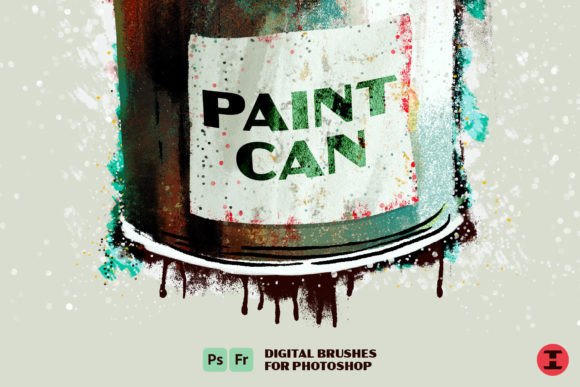
In the expansive ecosystem of digital art tools, Paint Can Photoshop Brushes represent a distinct approach to texture and layering. Marketed under the evocative banner of "Welcome to Texture Town, population You," this brush set is designed for artists who seek to break away from the sterile precision often associated with digital illustration. Rather than offering clean, uniform strokes, these brushes provide a "hot mess" of paint textures intentionally crafted to mimic the unpredictability of physical media. For designers and illustrators evaluating their toolkit, understanding the specific capabilities and limitations of these brushes is essential for determining if they align with your creative workflow.
Understanding the Core Functionality
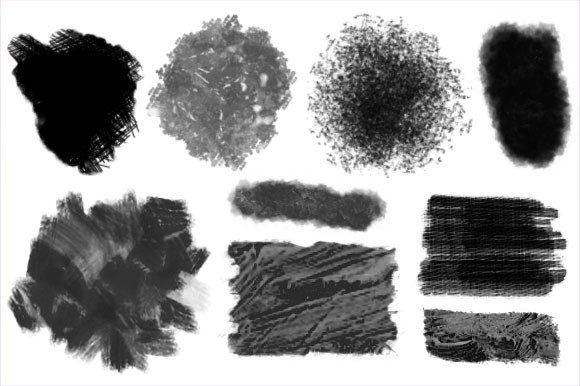
The primary value proposition of the Paint Can Photoshop Brushes lies in their diversity and intentional imperfection. The collection includes a wide array of stroke types, ranging from sharp spatters and aerosol-like sprays to heavy grunge and decay effects. Unlike standard round or flat brushes that rely solely on opacity and flow settings to create variation, these brushes embed complex texture maps directly into the brush tip dynamics. This allows users to achieve realistic wear, tear, and organic buildup without manually overlaying separate texture images.
A standout feature of this set is the inclusion of new grimy blenders. These tools are not merely for smudging colors; they are engineered to interact with underlying layers in a way that simulates the physical mixing of wet paint. This capability supports the creation of custom textures and sophisticated layering, enabling artists to build depth through accumulation rather than just placement. The result is a workflow that feels less like plotting pixels and more like manipulating matter on a canvas.
The Appeal of Analog Simulation
Why do digital artists seek out tools like Paint Can Photoshop Brushes? The answer often revolves around the desire for authenticity. Digital art can sometimes appear too perfect, lacking the subtle irregularities that give traditional paintings their character. By incorporating color-mixing analog effects, these brushes mimic the blending behavior of actual paint. When you drag a brush across a dried layer, it picks up pigment; when you blend two wet areas, they merge organically. This functionality allows for the creation of subtle monochromatic pieces where tonal variation is key, as well as wild, color-blended combinations that retain visual coherence despite their chaos.
For professionals working in concept art, editorial illustration, or graphic design, this level of control over texture can significantly reduce post-production time. Instead of spending hours adding noise, grain, or distress effects in separate steps, the texture is inherent to the brush stroke itself. This integration streamlines the creative process, allowing for faster iteration and more intuitive experimentation.
Evaluating Benefits and Tradeoffs
When considering the adoption of Paint Can Photoshop Brushes, it is important to weigh the benefits against potential tradeoffs. On the positive side, the versatility of the set is considerable. The ability to switch between fine spatters and broad, grimy blends within the same toolset provides a cohesive visual language for a project. The learning curve for basic application is relatively low for anyone familiar with Photoshop’s brush engine, as the complex behaviors are pre-configured.
However, there are considerations regarding performance and control. High-resolution texture brushes can be resource-intensive, potentially slowing down older hardware or large canvases. Additionally, the "hot mess" aesthetic, while desirable for certain styles, may require careful management to avoid cluttering a composition. Artists who prefer precise, vector-like cleanliness may find the inherent randomness of these brushes frustrating. The grimy blenders, while powerful, require a nuanced touch; overuse can lead to muddy colors rather than rich blends. Therefore, expectation management is crucial: these tools excel at organic, expressive work but may struggle with technical, geometric precision.
Ideal Use Cases
The Paint Can Photoshop Brushes are a strong fit for several specific scenarios. They are particularly effective in:
- Grunge and Urban Design: Projects requiring a distressed, street-art vibe benefit immensely from the spray and decay textures.
- Concept Art and Environment Design: Creating weathered surfaces, rusted metal, or aged walls becomes intuitive with the built-in grunge effects.
- Expressive Illustration: Artists looking to convey emotion through chaotic energy can leverage the spatters and unpredictable blends.
- Texture Creation: Designers can use the brushes to generate seamless patterns or background elements that serve as bases for further manipulation.
In these contexts, the brushes do not just add detail; they define the mood and atmosphere of the piece. The analog mixing effects allow for a painterly quality that resonates with viewers accustomed to traditional media.
When to Consider Alternatives
Despite their strengths, Paint Can Photoshop Brushes are not a universal solution. If your primary focus is on clean line art, technical diagrams, or minimalist flat design, these brushes may introduce unnecessary complexity. In such cases, standard hard-round brushes or vector tools in Adobe Illustrator might be more appropriate. Furthermore, if you require absolute consistency across multiple assets, the randomized nature of texture brushes can make replication difficult. Artists who need precise control over every pixel may prefer custom-built brushes with minimal texture interference or rely on photo-bashing techniques for realism.
Additionally, those working primarily in 3D texturing software like Substance Painter may find that dedicated 3D painting tools offer more accurate physical simulation for product visualization. While Paint Can Photoshop Brushes mimic analog effects well, they are still operating within a 2D raster environment, which has inherent limitations compared to true 3D material workflows.
Making an Informed Decision
To determine if Paint Can Photoshop Brushes align with your goals, assess your current artistic challenges. Do you spend excessive time adding texture overlays? Do you struggle to make digital paintings feel "alive" or tactile? If so, this set offers a practical solution by embedding those qualities directly into your brushwork. Evaluate your hardware capabilities to ensure smooth performance, and consider dedicating time to experiment with the grimy blenders, as they represent the most unique aspect of the collection.
Ultimately, the decision comes down to style and workflow preference. For artists seeking to inject organic chaos and analog warmth into their digital projects, these brushes provide a robust, versatile toolkit. They invite you to embrace the mess, offering a pathway to richer, more textured creations that stand out in a digitally saturated landscape. By understanding both the creative potential and the technical constraints, you can effectively integrate these tools into your repertoire and enhance the depth of your visual storytelling.