Mastering Digital Fur: A Deep Dive into Furry Hairy Procreate Brushes
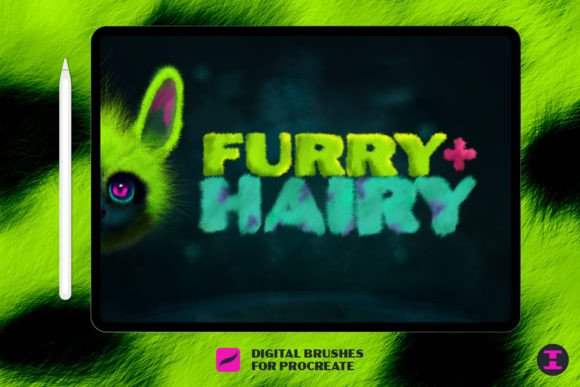
In the evolving landscape of digital illustration, texture is often the dividing line between a flat image and a living, breathing piece of art. Nowhere is this more evident than in the depiction of animals, mythical creatures, and detailed character portraits. For artists working on iPads, the quest for realistic or stylized fur has long been a challenge of patience and precision. This is where specialized tools like Furry Hairy Procreate Brushes change the game. By offering granular control over individual strands and complex patterns, these brushes allow creators to say goodbye to bad hair days and hello to professional-grade results.
The Art of Digital Texture
Creating convincing fur digitally requires more than just a soft airbrush. It demands an understanding of flow, density, and light interaction. Standard round brushes often fail to capture the chaotic yet organized nature of hair. When you attempt to paint a lion’s mane or a wolf’s coat with generic tools, the result can look muddy or overly uniform. Furry Hairy Procreate Brushes are engineered to mimic the physical behavior of hair, providing the variability needed for realism.
These tools are not merely about adding noise to a surface; they are about constructing depth. Each stroke can simulate the layering of undercoat and guard hairs, allowing the artist to build up volume naturally. This capability is essential for anyone looking to elevate their character design or wildlife illustration portfolio.
Key Features and Capabilities
What sets this specific collection apart is its versatility. The brushes are designed to handle a wide spectrum of tasks, from broad textural fills to microscopic detailing. Here are the core characteristics that define their utility:
- Strand-Level Control: The ability to paint in a single strand of hair is crucial for retouching jobs or adding fine details to eyes and ears. This precision ensures that no detail is too small to address.
- Pattern Generation: Creating complex patterns, such as a cheetah’s spots integrated into the fur direction, becomes intuitive. You do not need to manually place every spot; the brush dynamics help blend pattern and texture seamlessly.
- Pressure Sensitivity Optimization: These brushes leverage the Apple Pencil’s pressure sensitivity to vary stroke width and opacity, mimicking the natural taper of real hair.
- Customizable Flow: Artists can adjust the scatter and jitter settings to create everything from sleek, wet fur to wild, unkempt manes.
Practical Applications for Creators
The utility of Furry Hairy Procreate Brushes extends beyond simple animal portraits. They are valuable assets for various creative disciplines. Understanding where and how to apply them can significantly enhance your workflow.
Character Design and Concept Art
For concept artists working in gaming or film, speed and clarity are paramount. When designing a new creature, you need to communicate texture quickly. These brushes allow for rapid iteration. You can block in the general shape of a beast and immediately add textural cues that suggest weight and movement. Whether it is the slimy scales of a dragon transitioning into furry patches or the thick wool of a fantasy sheep, these tools provide the visual language needed to sell the design.
Photographic Retouching and Enhancement
Digital painters often work over photographs, especially in the pet portrait industry. A common issue in photography is patchy fur due to lighting or shedding. With these brushes, you can fill in gaps seamlessly. By sampling colors from the surrounding area and painting in new strands that follow the natural growth direction, you can correct imperfections without making the image look digitally altered. This is particularly useful for high-end pet portraits where clients expect perfection.
Illustration and Storytelling
In children’s books or graphic novels, style varies widely. While some projects require hyper-realism, others benefit from stylized, expressive fur. The flexibility of these brushes allows artists to switch modes. You can use heavy scatter for a cartoonish, fluffy look or tight, controlled strokes for a serious, dramatic tone. This adaptability makes them a staple in any illustrator’s toolkit.
Evaluating Suitability for Your Workflow
Before integrating any new tool into your arsenal, it is important to assess whether it fits your specific needs. While Furry Hairy Procreate Brushes are powerful, they are not a one-size-fits-all solution for every texture.
- Project Scale: If you are working on small icons or low-resolution web graphics, highly detailed fur brushes may be overkill and could clutter the design. They shine best in medium to large-scale illustrations where detail is visible.
- Style Preference: If your artistic style is strictly geometric or flat vector-based, these organic brushes may not align with your aesthetic. They are best suited for painterly, semi-realistic, or expressive styles.
- Learning Curve: While user-friendly, mastering the nuance of pressure and angle requires practice. Beginners should expect a period of experimentation to understand how the brushes react to different speeds and angles.
Strengths and Considerations
Like any digital tool, these brushes come with strengths and limitations. Recognizing these helps manage expectations and improves outcomes.
Strengths:
- Time Efficiency: What might take hours with a standard round brush can be achieved in minutes. The pre-set dynamics save immense amounts of manual adjustment.
- Natural Variation: The algorithms behind the brushes introduce randomization that prevents repetitive, robotic patterns. This keeps the artwork looking organic.
- Non-Destructive Potential: When used on separate layers with appropriate blending modes, these textures can be adjusted or removed without damaging the underlying sketch or color base.
Considerations:
- File Size: High-detail brush strokes can increase file size, potentially slowing down older iPad models. It is advisable to merge layers periodically or work at reasonable resolutions.
- Overuse Risk: It is easy to rely too heavily on the brush’s default settings. To maintain artistic integrity, always customize the brush size and opacity to suit the specific lighting and mood of your piece.
Real-World Scenarios: Bringing Creatures to Life
Imagine you are tasked with illustrating a mythical griffin. The creature has the body of a lion and the head of an eagle. Transitioning between feathers and fur is notoriously difficult. Using Furry Hairy Procreate Brushes, you can start with the lion’s body, laying down dense, warm-toned fur. As you move toward the neck, you can reduce the density and lengthen the strokes, blending them into the feather layers. This seamless transition creates a believable hybrid creature rather than two distinct animals pasted together.
Another scenario involves a fashion illustration featuring a faux-fur coat. The challenge here is not just texture, but weight and drape. By varying the direction of the brush strokes to follow the folds of the fabric, you can convey the heaviness of the material. Highlighting the tips of the fur with a lighter color adds dimension, making the coat look plush and expensive.
Tips for Maximizing Results
To get the most out of your investment, consider these practical tips:
First, always study reference images. Even with the best brushes, understanding how light hits fur is critical. Notice how backlit fur glows and how shadowed fur clumps together. Second, experiment with layer blending modes. Using Multiply for shadows and Overlay for highlights can add depth without additional painting. Finally, do not be afraid to combine these brushes with other tools. A soft smudge tool can help blend harsh edges, while a sharp eraser can carve out individual strands for added realism.
Conclusion
The Furry Hairy Procreate Brushes represent a significant leap forward for digital artists seeking to master texture. They offer infinite possibilities, from creating your own cheetah fur patterns to fixing patchy beards in photo retouching. By providing total control over every last strand, they empower creators to bring new creatures to life with confidence and precision. Whether you are a professional illustrator, a hobbyist, or a business owner creating marketing materials, these tools provide the technical foundation needed to achieve artistic excellence. Embrace the complexity of fur, and let your digital creations stand out with unparalleled realism and style.