Mastering Digital Aquarelle: A Deep Dive into Watercolor Brushes V.2 for Procreate
The transition from traditional media to digital illustration has long been a point of contention for artists who cherish the tactile unpredictability of physical paint. While digital tools offer undo buttons and infinite layers, they often lack the organic bleed, granulation, and texture that define authentic watercolor painting. However, recent advancements in brush engine technology have bridged this gap significantly. Among the most notable tools designed to replicate this delicate medium is Watercolor Brushes V.2 for Procreate. This specialized brush set is not merely a collection of digital stamps but a sophisticated toolkit engineered to mimic the fluid dynamics of water and pigment on paper, specifically tailored for the iOS ecosystem.
The Architecture of Digital Wetness
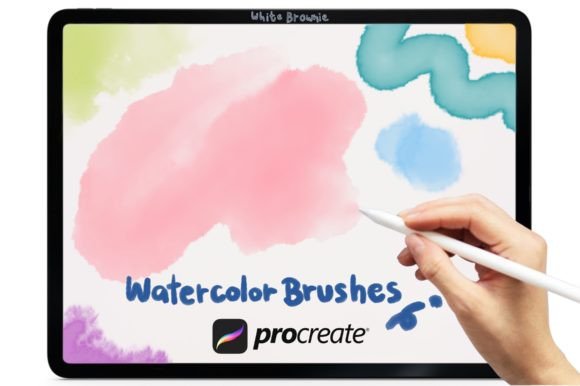
To understand the value of this toolset, one must first appreciate the technical challenge it solves. Watercolor is defined by its transparency and the way pigments settle into the tooth of the paper. In a digital environment, achieving this requires complex algorithms that simulate wet-on-wet diffusion, edge hardening, and color mixing. The Watercolor Brushes V.2 for Procreate package addresses these nuances through a curated selection of fourteen distinct brush presets. Each brush is calibrated to respond to pressure, tilt, and speed, allowing the artist to control the flow of "paint" with intuitive gestures.
Included within this suite are specific tools designed for different stages of the painting process. There are brushes for broad washes that lay down foundational colors with soft, bleeding edges, and finer tips for detailed linework that retains a rough, hand-drawn aesthetic. Crucially, the set includes a dedicated Watercolor Blender brush. In traditional painting, blending is achieved by manipulating water content; digitally, this is often handled by smudging tools that can muddy colors. The included blender in this set is optimized to soften edges and merge hues without losing the luminous quality of the underlying layers, preserving the clarity that makes watercolor so appealing.
Versatility Across Creative Disciplines
While the primary association with watercolor is fine art illustration, the utility of these brushes extends far beyond gallery pieces. The organic texture provided by Watercolor Brushes V.2 for Procreate adds a human touch to commercial design projects that often suffer from sterile, vector-based perfection. Here is how various creators can leverage this toolset:
- Greeting Card Design: The emotional resonance of hand-painted elements makes these brushes ideal for creating unique greeting cards. Artists can paint floral motifs, abstract backgrounds, or whimsical characters that feel personal and heartfelt, distinguishing their products in a saturated market.
- Wedding Stationery: Wedding invitations often rely on elegant, flowing aesthetics. The soft edges and pastel blending capabilities of these brushes allow designers to create sophisticated watercolor washes that serve as backdrops for typography, evoking romance and elegance without the cost of hiring a calligrapher for every element.
- Logo and Brand Identity: For brands seeking an artisanal, eco-friendly, or boutique image, watercolor logos offer a distinctive alternative to rigid geometric shapes. These brushes enable the creation of textured icons and wordmarks that convey authenticity and craftsmanship.
- Quote Graphics and Social Media Content: In the realm of digital marketing, standing out requires visual interest. Overlaying inspirational quotes on subtle watercolor textures created with this set can increase engagement by adding depth and warmth to otherwise flat social media posts.
Technical Specifications and Compatibility
It is imperative for potential users to understand the technical constraints and requirements of this digital asset. The Watercolor Brushes V.2 for Procreate is distributed as .BRUSHSET files. This format is native to the Procreate application, ensuring seamless installation and immediate access to all fourteen brushes plus the blender tool. The set is explicitly designed for Procreate Version 5.0 and higher. Users with older versions of the app may experience compatibility issues or missing features, as the brush engine updates in version 5.0 introduced significant improvements to grain and shape dynamics that these brushes utilize.
A critical consideration for professionals working across multiple platforms is the exclusivity of this tool. These brushes DO NOT work in Photoshop, Clip Studio Paint, or any other desktop or mobile illustration software. They are engineered specifically for the Apple Pencil and iPad interface. This limitation is not a drawback but rather a specialization; the brushes are tuned to the specific latency, pressure sensitivity, and tilt recognition of the iPad hardware. Attempting to port these settings to other software would require extensive manual reconfiguration, often resulting in a loss of the intended behavior. Therefore, this tool is best suited for artists who have fully committed to the iPad as their primary creative device.
Workflow Integration and Best Practices
Integrating Watercolor Brushes V.2 for Procreate into a professional workflow requires a shift in mindset from layer-heavy vector design to a more painterly approach. Because watercolor relies on transparency, the order of operations matters. Artists should begin with light washes, using the broader brushes to establish value and composition. The included blender brush should be used sparingly between layers to soften transitions, mimicking the way water pulls pigment across paper.
One effective technique is to utilize the "Multiply" blend mode for darker accents. By painting shadows on a separate layer set to Multiply, artists can deepen colors without obscuring the texture of the underlying washes. This non-destructive method allows for iterative refinement, a key advantage of digital media. Furthermore, because the brushes simulate real-world physics, varying the pressure on the Apple Pencil will yield different results. Light pressure creates faint, watery trails, while heavy pressure deposits dense, saturated pigment. Mastering this dynamic range is essential for achieving realistic results.
The Economic and Environmental Advantage
Beyond artistic capability, there are practical benefits to adopting digital watercolor tools. Traditional watercolor painting requires a constant supply of consumables: high-quality paper, paints, brushes, and cleaning supplies. Over time, these costs accumulate. Additionally, the setup and cleanup time for traditional media can be significant, acting as a barrier to spontaneous creativity. With Watercolor Brushes V.2 for Procreate, the artist is always ready to create. There is no drying time, no wasted paint, and no need for physical storage space for supplies.
From an environmental perspective, digital art eliminates the waste associated with failed experiments or discarded materials. For educators and students, this accessibility lowers the barrier to entry. Schools and workshops can teach the principles of color theory and composition using these brushes without the logistical burden of managing wet media in a classroom setting. Students can experiment freely, knowing that mistakes are easily corrected, fostering a safer learning environment for creative risk-taking.
Conclusion: Elevating Digital Artistry
The Watercolor Brushes V.2 for Procreate represents more than just a digital imitation of traditional media; it is a reimagining of what watercolor can be in the modern age. By combining the organic beauty of hand-painted textures with the efficiency and flexibility of digital tools, it empowers a wide range of creators—from hobbyists to professional designers—to produce work that is both visually stunning and commercially viable. Whether crafting intricate wedding invitations, bold logo designs, or expressive fine art, this brush set provides the necessary tools to bring a touch of handmade warmth to the digital canvas. As the demand for authentic, human-centric design continues to grow, mastering such specialized digital tools becomes an invaluable asset in any creator's portfolio.