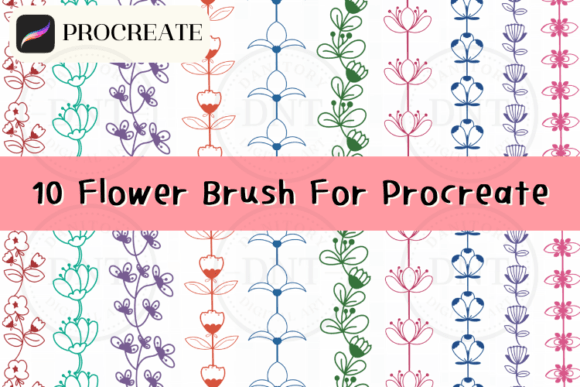
Evaluating the 10 Flower Brushes for Procreate Set
Digital illustration has evolved significantly, offering artists tools that mimic traditional media while providing the flexibility of vector-like editing. Among the vast array of resources available to iPad users, specialized brush sets serve as essential components for efficient workflow and stylistic consistency. The 10 Flower Brushes for Procreate represents a focused collection designed to streamline the creation of floral elements in digital art. This article examines the utility, application, and strategic value of this specific brush set for designers, illustrators, and hobbyists.
Understanding the Toolset
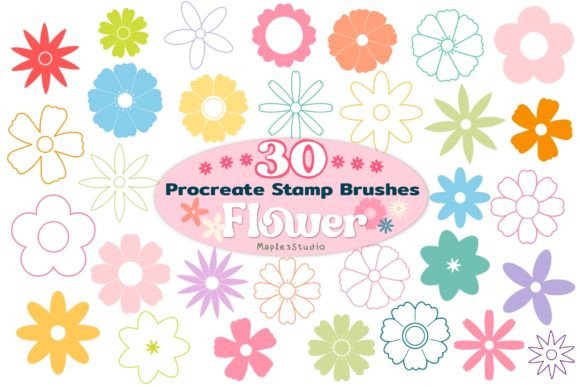
The core offering consists of ten distinct stamp brushes, each engineered to replicate various floral shapes and botanical details. Unlike standard painting brushes that require manual stroke construction, these are stamp-based tools. This means that a single tap on the canvas generates a complete flower image. The set is delivered as a single brush set file, which simplifies the installation process within the Procreate ecosystem. Once imported, these brushes function exclusively within the Procreate application on iPad, leveraging the software’s native engine for rendering.
The primary appeal of this tool lies in its versatility across multiple design disciplines. Users can employ these brushes for creating digital assets intended for print, such as stationery, packaging, and wall art. Similarly, they are suitable for digital-only outputs, including Instagram posts, blog graphics, and surface patterns. The ability to scale, resize, and adjust opacity allows for significant customization, enabling artists to integrate these pre-made elements seamlessly into broader compositions.
Strategic Benefits for Designers
For professionals and enthusiasts alike, time efficiency is a critical factor in project completion. Manually drawing intricate flowers requires a high level of technical skill and considerable time investment. By utilizing the 10 Flower Brushes for Procreate, creators can bypass the initial sketching phase for floral motifs. This acceleration is particularly beneficial for commercial projects with tight deadlines, such as business card designs or social media content calendars.
Another significant advantage is consistency. In branding and pattern design, maintaining a uniform style across various elements is crucial. These brushes provide a cohesive aesthetic, ensuring that every floral element shares similar line weights, textures, and proportions. This uniformity helps in creating professional-looking surface patterns and packaging designs where repetitive elements must harmonize visually.
Furthermore, the non-destructive nature of digital layers allows for extensive experimentation. Artists can place a flower stamp, adjust its color using Procreate’s adjustment tools, change its opacity for depth, or resize it to fit specific compositional needs. This flexibility encourages iterative design without the fear of ruining the underlying artwork, a limitation often present in traditional media.
Practical Applications and Use Cases
The utility of this brush set extends beyond simple illustration. Here are several scenarios where these tools prove particularly effective:
- Stationery and Printables: Designers can quickly generate borders and accents for wedding invitations, greeting cards, and planners. The scalable nature of the stamps ensures high-resolution output suitable for printing.
- Social Media Content: Bloggers and influencers can use these brushes to create eye-catching headers, story backgrounds, and post overlays. The ease of use allows for rapid content production.
- Surface Pattern Design: Creating seamless patterns requires repeating elements. These flower stamps can be scattered, rotated, and layered to build complex textile or wallpaper designs efficiently.
- Educational Materials: Teachers and educational content creators can incorporate floral elements into worksheets and presentations to enhance visual appeal without needing advanced drawing skills.
Installation and Technical Considerations
Integrating the brush set into your workflow is straightforward, though it requires familiarity with iOS file management. The process begins by downloading the brush set file to your iPad. If the file is zipped, it must be unzipped first. Procreate typically recognizes the file format automatically. Upon tapping the file, users should select "Open in Procreate" from the share menu. If this option is not immediately visible, navigating through the "More" options will reveal it. Once selected, the brushes import directly into the user’s brush library, ready for immediate use.
It is important to note that these brushes are compatible only with Procreate. They will not function in other digital art applications such as Adobe Fresco, Clip Studio Paint, or Photoshop. This limitation necessitates that users are committed to the Procreate ecosystem. Additionally, while the brushes are scalable, extreme enlargement may result in pixelation depending on the original resolution of the stamp. Users should test the limits of scalability within their specific project dimensions to ensure print-quality results.
Evaluating Fit: When to Choose This Set
Deciding whether to incorporate the 10 Flower Brushes for Procreate into your toolkit depends on your specific creative goals and workflow preferences. This set is an ideal choice if you prioritize speed and consistency over unique, hand-drawn imperfections. It is particularly well-suited for graphic designers who need to produce high volumes of content, such as social media managers or print-on-demand sellers.
However, there are tradeoffs to consider. Stamp brushes offer less organic variation than hand-painted strokes. If your artistic style relies heavily on expressive, loose, or highly customized botanical illustrations, you may find these presets restrictive. In such cases, investing time in learning custom brush creation or using standard painting brushes might yield more satisfying results. Additionally, because these are shared assets, there is a possibility that other designers may use identical elements, which could dilute brand uniqueness if not modified significantly through color and composition.
Alternatives and Complementary Tools
For those seeking greater control, alternative approaches include using vector-based floral assets in Adobe Illustrator, which offer infinite scalability without quality loss. Alternatively, artists might prefer purchasing comprehensive brush packs that include both stamp and painting brushes, allowing for a hybrid approach. Some creators may also choose to develop their own custom brushes from scanned traditional drawings, ensuring complete originality.
Nevertheless, for users seeking a balance between ease of use and professional output, this ten-brush set offers a compelling solution. It lowers the barrier to entry for creating polished floral designs, making it accessible to beginners while remaining useful for professionals needing to expedite their workflow. By understanding the capabilities and limitations of these tools, artists can make informed decisions about integrating them into their digital art practice.
In conclusion, the 10 Flower Brushes for Procreate serves as a practical resource for enhancing digital design efficiency. Whether used for intricate illustrations or quick social media graphics, these brushes provide a reliable foundation for floral-themed projects. By aligning the tool’s strengths with your specific design needs, you can maximize its value and elevate the quality of your digital creations.