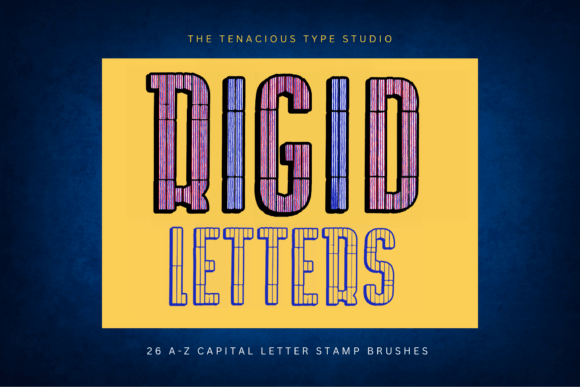
Evaluating Rigid Letter Stamp Brushes for Procreate
Digital lettering has evolved from freehand sketching to sophisticated workflows that blend automation with artistic control. For designers, crafters, and hobbyists using the iPad, finding tools that streamline repetitive tasks without sacrificing quality is essential. The Rigid Letter Stamp Brushes for Procreate represent a specific category of digital assets designed to address this need. This set includes 26 individual brushes, each corresponding to a letter of the alphabet from A to Z. Unlike standard calligraphy brushes that require manual stroke construction, these tools function as stamps, allowing users to place pre-defined rigid block letters directly onto the canvas.
Understanding whether this tool aligns with your workflow requires an examination of its technical specifications, practical applications, and inherent limitations. This evaluation aims to provide a balanced perspective for those considering integrating these stamps into their digital design process.
Core Functionality and Technical Specifications
The primary feature of the Rigid Letter Stamp Brushes for Procreate is their orientation and responsiveness. Each stamp is oriented to the screen, meaning the letter appears upright relative to the device’s display regardless of how the Apple Pencil is held. This differs significantly from traditional calligraphy brushes, which often rotate based on pen angle. Furthermore, the brushes support variable pressure at input. While the shape of the letter remains a rigid block outline, the pressure sensitivity can affect the opacity or thickness of the stroke depending on the specific brush settings configured by the developer, offering a degree of dynamic expression within a structured format.
Compatibility is a critical consideration. This specific set is compatible only with Procreate 5. Users operating on older versions of the software will not be able to utilize these brushes effectively, if at all. This restriction highlights the importance of verifying software updates before purchase or download. The "rigid" nature of the letters implies a geometric, sans-serif aesthetic, distinct from fluid script or handwritten styles. This makes them particularly suitable for projects requiring clarity, modernity, and structural consistency.
Practical Applications and Use Cases
The utility of these stamps becomes evident in scenarios where speed and uniformity are prioritized over organic variation. For crafting projects, such as designing digital invitations, greeting cards, or social media graphics, the ability to quickly spell out words without manually drawing each character saves considerable time. Seasonal projects, such as holiday-themed designs or special occasion announcements, often require repetitive text elements. Using a stamp set ensures that every instance of a letter maintains the same proportion and style, creating a cohesive visual identity.
For educators or content creators producing worksheets, labels, or instructional materials, the clarity of rigid block letters is advantageous. The outline style allows for easy coloring or filling, making it versatile for both print and digital mediums. Additionally, because the letters are individual brushes rather than a font file, they can be manipulated independently. Users can resize, rotate, and recolor each letter separately, offering flexibility that standard typography tools may not provide as intuitively within the Procreate interface.
Benefits of Using Letter Stamps
- Efficiency: The most significant benefit is time savings. Creating consistent block letters by hand requires precision and practice. Stamps eliminate the learning curve associated with drawing perfect geometric shapes.
- Consistency: In design, uniformity is key. These brushes ensure that every "A" looks identical to every other "A," maintaining visual harmony across the project.
- Accessibility: For individuals who struggle with fine motor control or freehand lettering, stamp brushes provide a professional result without the need for advanced drawing skills.
- Creative Flexibility: Since each letter is a separate layer element, designers can experiment with spacing, overlap, and color blocking more freely than when using static text boxes.
Tradeoffs and Limitations
While efficient, the Rigid Letter Stamp Brushes for Procreate are not a universal solution. The rigid block style limits aesthetic diversity. Projects requiring elegance, flow, or personal handwriting characteristics will not benefit from this tool. The "stamp" nature means that kerning—the spacing between characters—must be managed manually. Unlike typed text, which automatically adjusts spacing based on font metrics, users must visually align each letter, which can be tedious for longer passages of text.
Another consideration is the lack of true typographic control. Users cannot adjust leading, tracking, or font weight through a menu. Each adjustment requires manual manipulation of the layer. For extensive body text, this approach is impractical and inefficient compared to using Procreate’s native text tool or importing a custom font. Therefore, these brushes are best suited for headlines, titles, logos, or short decorative phrases rather than paragraphs.
Decision-Making Insights: Is This Tool Right for You?
To determine if this brush set aligns with your goals, consider your typical project requirements. If you frequently create designs that feature bold, modern typography and value speed over hand-drawn authenticity, these stamps are a strong fit. They are particularly valuable for small business owners creating marketing materials, teachers designing classroom resources, or hobbyists making personalized gifts.
However, if your work focuses on calligraphy, intricate hand-lettering, or long-form text, alternatives may be worth considering. Standard calligraphy brushes offer greater expressive potential, while Procreate’s text tool provides superior efficiency for large volumes of text. Additionally, if you require a wide variety of font styles, investing in a comprehensive font library might offer more versatility than a single set of rigid block letters.
Integration into Your Workflow
Integrating these brushes requires a shift in mindset from writing to composing. Instead of flowing through a word, you place each letter as a distinct object. This method encourages a modular approach to design. Users can create a library of commonly used words or phrases by grouping layers, further enhancing efficiency for future projects. It is also advisable to experiment with the pressure sensitivity settings to understand how the variable input affects the outline’s appearance, allowing for subtle customization within the rigid framework.
In conclusion, the Rigid Letter Stamp Brushes for Procreate serve a niche but valuable purpose in the digital designer’s toolkit. They bridge the gap between manual artistry and automated typography, offering a balance of control and convenience. By understanding their specific strengths and limitations, users can make informed decisions about when to employ these stamps and when to rely on other tools, ultimately enhancing their creative productivity and output quality.