Unlocking Digital Jewelry Design: A Comprehensive Guide to Magic Chain Brushes Vol.3 for Procreate
In the rapidly evolving world of digital illustration, efficiency and realism are often at odds. Artists frequently spend hours rendering intricate details like metal textures, reflections, and complex geometries. However, specialized tools have emerged to bridge this gap, allowing creators to produce high-quality assets in a fraction of the time. One such tool that has gained significant attention among iPad artists is the Magic Chain Brushes Vol.3 for Procreate. This specialized brush set is designed to revolutionize how designers approach jewelry illustration, offering a seamless blend of artistic control and automated detail.
The Evolution of Digital Asset Creation
Digital art has moved far beyond simple sketching. Today, it encompasses concept art for games, fashion design, product visualization, and social media content creation. Within these fields, accessories play a crucial role. A character’s necklace or a model’s bracelet can define their personality or elevate a fashion sketch from good to great. Yet, drawing chains manually is notoriously difficult. It requires a keen understanding of perspective, light reflection, and repetitive pattern consistency.
This is where Magic Chain Brushes Vol.3 steps in. Rather than drawing every single link by hand, artists can utilize pre-engineered brushes that simulate the physics and aesthetics of real metal chains. This does not mean sacrificing creativity; instead, it frees up mental energy for composition, color theory, and storytelling. For modern creatives, understanding how to leverage these tools is essential for maintaining a competitive edge in fast-paced industries.
What Makes Vol.3 Unique?
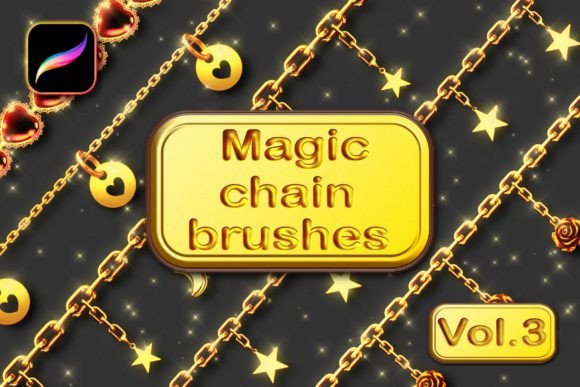
The third volume of this series focuses on versatility and realism. The set includes 15 Magic chain brushes specifically optimized for the Procreate app. Unlike generic stamp brushes that look flat and repetitive, these brushes are engineered to be opaque, realistic, and fully compatible with Procreate’s advanced color dynamics.
The core value proposition lies in the ability to change colors using the Gradient Map feature. This allows a single brush stroke to transform from gold to silver, or from rose gold to oxidized copper, simply by adjusting the layer settings. This level of customization ensures that the brushes fit naturally into any artistic style, whether you are creating hyper-realistic product renders or stylized character designs.
Breakdown of the Brush Set
To truly understand the utility of this package, it is helpful to examine its components. The set is not just a collection of random shapes; it is a curated toolkit designed for specific outcomes.
- 13 Various Chain Brushes: These cover a wide range of styles, from delicate cable chains to heavy curb links. Each brush is designed to handle different thicknesses and densities, allowing for diverse jewelry types.
- 2 Sparkling Glitter Brushes: Jewelry is rarely just metal. Gemstones and polished surfaces catch the light. These additional brushes add that essential "bling" factor, providing highlights and sparkles that make the piece feel tangible and expensive.
- Educational Resources: The package includes a quick tutorial in PDF format and access to a video tutorial on the creator’s YouTube channel. This support system is vital for beginners who may be unfamiliar with advanced Procreate features.
Technical Requirements and Setup
While the brushes are powerful, they require specific settings to function correctly. A common misunderstanding among new users is that digital brushes work like physical pens—they do not. They are software scripts that interact with the app’s engine. To get the best results from Magic Chain Brushes Vol.3, you must adhere to certain technical prerequisites.
First and foremost, compatibility is key. These brushes are designed exclusively for the Procreate application on Apple iPad. They will not work with Adobe Photoshop, Clip Studio Paint, or any other graphic editing software. This limitation is due to the unique way Procreate handles brush dynamics and file structures.
Crucial Settings for Optimal Performance
Before you begin drawing, there are two critical steps you must take. Ignoring these will result in flat, unconvincing lines that fail to capture the metallic essence of the chains.
- Color Selection: You must set both your Primary Color and Secondary Color before use. The brushes utilize these two colors to create depth and shading within each link. Typically, the primary color represents the highlight or base metal tone, while the secondary color provides the shadow or darker accent.
- Dynamic Brush Scaling: For the best result, always turn Dynamic brush scaling on. This feature ensures that the brush tip adjusts smoothly as you change pressure or speed, preventing pixelation and maintaining the crispness of the chain links.
By configuring these settings, you unlock the full potential of the brushes, allowing them to respond naturally to your hand movements.
Installation Guide
Installing custom brushes in Procreate is straightforward, but it can be confusing for first-time users. Here is a step-by-step guide to getting your Magic Chain Brushes Vol.3 ready for use:
- Download the File: After purchase, download the .zip file to your iPad. It is often easiest to save this to your Files app.
- Preview Content: Navigate to the .zip file in your Files app. Tap on it to preview the content. You should see the brushes file inside.
- Import to Procreate: Click on the brushes file. Your iPad should automatically recognize it as a Procreate brush set and import it directly into the app.
- Verify Installation: Open Procreate and check your brush library. The new set should appear at the top of your list or in a dedicated folder.
Practical Applications in Modern Creativity
Why should an artist invest in specialized chain brushes? The answer lies in workflow efficiency and professional quality. Consider a fashion illustrator working on a deadline. Drawing a complex gold necklace link-by-link could take thirty minutes. With these brushes, the same result can be achieved in seconds, leaving more time to refine the garment’s fabric texture or the model’s pose.
Similarly, concept artists for video games or films can use these brushes to quickly iterate on character designs. Being able to swap out a silver chain for a gold one instantly allows for rapid experimentation with character wealth, status, and style. In educational settings, these tools can help students understand the principles of light and reflection on metallic surfaces without getting bogged down in the tedious mechanics of drawing every curve.
Avoiding Common Pitfalls
Even with the right tools, mistakes can happen. One common error is overusing the brushes. While they are realistic, they are still stamps. If used without variation in pressure or direction, the chains can look robotic. To avoid this, vary your stroke length and overlap sections slightly to create a natural flow. Additionally, always use the provided tutorials to understand how the Gradient Map interacts with your specific color choices. A poorly chosen gradient can make gold look like plastic, so experimentation is key.
Conclusion
The Magic Chain Brushes Vol.3 for Procreate represents a significant leap forward in digital jewelry design. By combining realistic textures, customizable colors, and user-friendly installation, this set empowers artists to create stunning, professional-grade illustrations with ease. Whether you are a seasoned professional looking to speed up your workflow or a beginner eager to explore the nuances of metallic rendering, these brushes offer a valuable addition to your digital toolkit. Remember to respect the technical requirements, utilize the educational resources provided, and let your creativity flow. With the right tools and knowledge, the possibilities for your digital art are limitless.