Mastering Whimsical Illustrations with Procreate Mushroom Fairy House Brushes
Digital illustration has democratized the creation of fantasy art, allowing artists of all skill levels to bring enchanting worlds to life. Among the most popular themes in this space is the cottagecore aesthetic, where Procreate Mushroom Fairy House Brushes have become an essential tool for creators. These specialized digital assets allow you to paint intricate, whimsical dwellings nestled within fungi without spending hours on repetitive line work. However, simply downloading a brush set does not guarantee professional results. Many artists struggle because they misunderstand how to integrate these stamps into a cohesive composition, leading to artwork that feels disjointed or amateurish.
Understanding the Value of Specialized Stamps
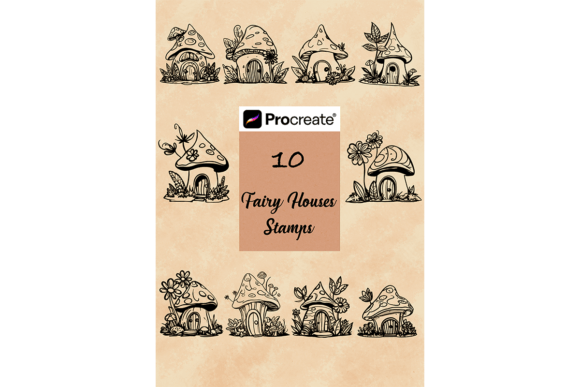
The primary appeal of using Procreate Mushroom Fairy House Brushes lies in efficiency and consistency. Creating a detailed fairy house from scratch requires a deep understanding of perspective, texture, and lighting. For beginners, this can be daunting. For professionals working on tight deadlines, it can be time-consuming. This collection includes 10 Mushroom Fairy house brushes stamps designed to streamline your workflow. By providing pre-designed structures, these tools allow you to focus on storytelling, color theory, and environmental integration rather than getting bogged down in architectural details.
It is crucial to recognize that these are not just simple shapes. They are complex assets meant to serve as the foundation of your scene. When used correctly, they provide a solid base upon which you can layer foliage, lighting effects, and character elements. The goal is to create an image that looks hand-painted and organic, not like a collage of clip-art. Understanding this distinction is the first step toward mastering these tools.
Common Pitfalls When Using Digital Stamps
One of the most frequent mistakes artists make is relying too heavily on the stamp without further customization. Dropping a mushroom house onto a canvas and leaving it untouched often results in a flat, sterile appearance. The lighting on the stamp may not match the light source in your background, or the colors may clash with your palette. This disconnect breaks the viewer’s immersion and makes the artwork feel assembled rather than created.
Another common oversight involves scale and perspective. Users sometimes place multiple houses in a scene without adjusting their size relative to one another or the environment. This leads to confusing spatial relationships where a small mushroom appears larger than a nearby tree, undermining the realism of the fantasy setting. Additionally, many beginners fail to consider the resolution of their canvas. Since these are digital files, using them on a low-resolution document can result in pixelation when the final piece is printed or viewed on high-density screens.
There is also a technical misunderstanding regarding file compatibility. Some users attempt to import these files into other drawing applications, only to find they do not work. It is important to remember that these brushes are formatted specifically as .brushset files, meaning they are exclusive to the Procreate app on iPad. Trying to use them in Photoshop, Clip Studio Paint, or desktop versions of Procreate will lead to frustration and wasted time.
How to Avoid Integration Errors
To avoid the "sticker effect," you must treat the stamp as a starting point, not the finish line. Once you have placed a mushroom house, use Procreate’s blending modes and opacity settings to harmonize it with the background. Add shadows beneath the structure to ground it in the scene. Use a soft airbrush to paint ambient light hitting the roof or windows, ensuring it matches the direction of your primary light source. This extra layer of effort transforms a static stamp into a living part of your illustration.
When dealing with perspective, always establish a horizon line before placing your elements. Adjust the size of each house based on its distance from the viewer. If a house is meant to be in the foreground, it should be larger and more detailed. Background elements should be smaller and slightly less saturated to mimic atmospheric perspective. This technique adds depth and makes your fantasy world feel expansive and believable.
Regarding technical setup, always check your canvas dimensions before importing. For high-quality prints, aim for at least 300 DPI. If you are creating web content, ensure your resolution is sufficient for retina displays. This proactive step ensures that the crisp details of the mushroom textures remain sharp, preserving the quality of your work regardless of the output medium.
What You Get and How to Install Correctly
This package provides 10 Mushroom Fairy house brushes stamps for Procreate. These are digital files only; there is no physical product shipped. Before purchasing, ensure you have an iPad compatible with the Procreate app. The installation process is straightforward but requires specific steps to ensure the brushes appear correctly in your library.
Follow these instructions for a smooth setup:
- Download the file to your iPad. It will typically save to your Files app or Downloads folder.
- Locate the .brushset file.
- Tap on the file and select “Open in Procreate” or “Copy to Procreate.”
- Procreate will automatically import the set. You will find them in a new brush group at the bottom of your brush library.
If the brushes do not appear immediately, try restarting the app. Ensure your Procreate version is up to date, as older versions may have compatibility issues with newer brush formats. Remember, these brushes are designed specifically for the Apple Pencil and iPad interface, leveraging pressure sensitivity to give you control over the stamp placement and size.
Making the Right Choice for Your Workflow
Before integrating these tools into your projects, evaluate your current workflow. Are you creating children’s book illustrations, social media graphics, or personal hobby art? These Procreate Mushroom Fairy House Brushes are versatile enough for all these applications, but they shine brightest in narrative-driven pieces. If your goal is photorealism, these stylized stamps may not fit your aesthetic. However, if you aim for charm, whimsy, and speed, they are an invaluable asset.
Consider the licensing terms as well. While most digital brush sets allow for commercial use in finished artworks, it is wise to double-check the specific license included with your download. Generally, you can sell illustrations created with these brushes, but you cannot resell the brush files themselves. Respecting intellectual property rights protects you legally and supports the creator community.
Ultimately, the value of these brushes comes from how you use them. They are not a shortcut to bypass learning fundamental art skills, but rather a tool to enhance your efficiency. By combining these stamps with your own painting techniques, color adjustments, and compositional knowledge, you can create stunning, professional-grade fantasy art that captivates your audience. Take the time to experiment, layer, and refine, and you will find that these mushroom houses become a staple in your creative toolkit.