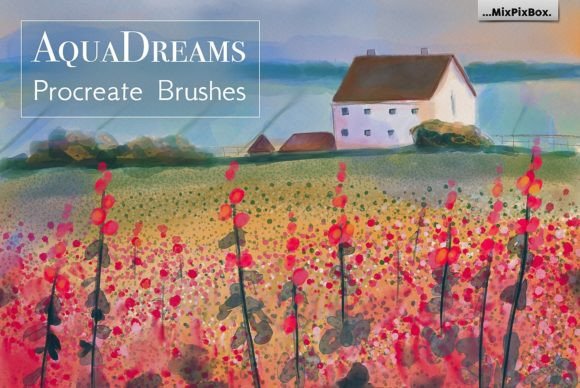
Master Digital Watercolor with Aqua Dreams Brushes
There is a distinct tactile joy in traditional watercolor painting that digital tools have struggled to replicate for years. The way pigment blooms on wet paper, the unpredictable granulation, and the soft, bleeding edges create an organic feel that rigid digital strokes often miss. If you are looking to bridge that gap between the physical and the digital, Aqua Dreams Procreate Brushes offers a compelling solution. This collection is not merely a set of stamps; it is a carefully engineered toolkit designed to mimic the fluid dynamics of real water-based media within the iPad ecosystem.
For designers, illustrators, and hobbyists alike, the appeal lies in the authenticity. These brushes capture the erratic beauty of watercolor without the mess, drying time, or cost of supplies. Whether you are creating loose botanical sketches for a lifestyle blog or detailed concept art for a client, understanding how to leverage these tools can significantly elevate your visual output.
The Aesthetic Personality of Digital Pigment
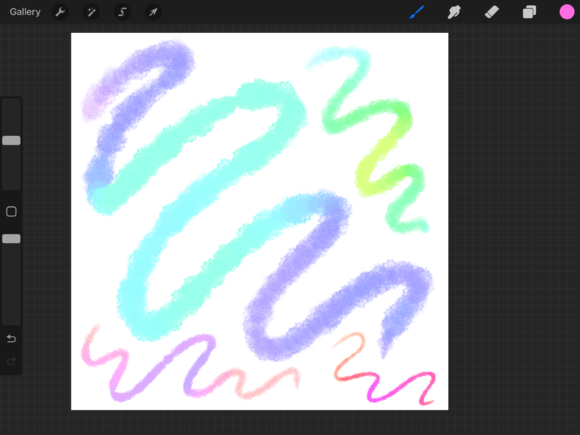
The visual characteristics of Aqua Dreams Procreate Brushes are defined by their responsiveness and texture. Unlike standard digital brushes that apply flat color, this set utilizes complex algorithms to simulate water flow and pigment density. The result is a style that feels breathable and alive. Each of the seventeen included brushes possesses unique traits, ranging from dry-brush scratchiness to wet-on-wet diffusion.
This variety allows for a high degree of artistic expression. You are not locked into a single "look." Instead, you can achieve the sharp precision needed for architectural details or the soft, dreamy washes required for background atmospheres. The inclusion of natural textures is particularly noteworthy. These textures add grain and depth, preventing your work from looking too sterile or computer-generated. For brand strategists and marketers, this authenticity translates into higher audience engagement, as viewers are drawn to imagery that feels handcrafted and genuine rather than mass-produced.
When we discuss modern typography and design assets, we often talk about the importance of human touch. The same principle applies here. Using brushes that emulate traditional media adds a layer of warmth to your brand identity. It suggests care, craftsmanship, and attention to detail—qualities that resonate deeply with consumers in today’s saturated digital marketplace.
Strategic Applications Across Creative Industries
While many assume watercolor tools are limited to fine art illustration, the versatility of Aqua Dreams Procreate Brushes extends far beyond the canvas. In the world of packaging design, for instance, hand-painted elements can differentiate a product on a crowded shelf. Imagine a skincare line using soft, floral watercolor accents to convey purity and natural ingredients. This approach creates an immediate emotional connection that vector graphics sometimes fail to establish.
In editorial design and publishing, these brushes can be used to create custom headers, drop caps, or background textures that guide the reader’s eye through long-form content. The organic nature of the strokes breaks up the rigidity of text columns, making the layout more inviting. Similarly, for social media graphics, where standing out is crucial, incorporating unique watercolor elements can stop the scroll. A quote overlaid on a subtle, textured wash feels more personal and shareable than a standard solid background.
For entrepreneurs and small business owners, these tools are invaluable for creating cohesive marketing materials. From business cards to website banners, maintaining a consistent aesthetic is key to professional recognition. By mastering a specific set of brushes, you ensure that your visual language remains uniform across all touchpoints. This consistency builds trust and reinforces your professional image.
Enhancing Readability and Visual Hierarchy
One might wonder how painterly tools impact readability and structure. The answer lies in contrast and balance. When used correctly, watercolor elements can enhance visual hierarchy by drawing attention to key areas without overwhelming the viewer. For example, a bold, saturated wash behind a headline can make the text pop, while lighter, diluted strokes can recede into the background, supporting secondary information.
However, caution is necessary. Overusing textured brushes can clutter a design and reduce legibility. The key is to use Aqua Dreams Procreate Brushes as complementary elements rather than the main event, especially when text is involved. Think of them as the stage lighting rather than the actor. They set the mood and direct focus, but they should not distract from the core message.
In web design, this balance is even more critical. Large, heavy textures can slow down load times if not optimized, and visually noisy backgrounds can hinder accessibility. Using these brushes to create lightweight SVG patterns or optimized PNG overlays allows you to maintain the aesthetic appeal without sacrificing performance or usability. This thoughtful integration demonstrates a sophisticated understanding of both art and function.
Practical Guidance for Implementation
Getting the most out of this brush set requires more than just downloading and clicking. Here are some practical steps to integrate these tools into your workflow effectively:
- Evaluate Project Fit: Before starting, ask if a watercolor aesthetic aligns with your brand’s voice. It works beautifully for wellness, creativity, and lifestyle sectors but may feel out of place in corporate finance or tech-heavy industries unless used very subtly.
- Test Font Pairings: Watercolor textures pair exceptionally well with clean sans serif font choices for a modern look, or elegant serif font options for a classic, editorial feel. Avoid overly decorative script font or handwritten font combinations unless you want a very casual, playful vibe, as this can become difficult to read.
- Layering Techniques: Do not rely on a single stroke. Build up your colors in layers, allowing each to dry digitally before adding the next. This mimics the traditional glazing technique and creates richer, more complex hues.
- Customization: Take advantage of the highly customizable nature of the brushes. Adjust opacity, flow, and size pressure to suit your specific iPad model and Apple Pencil sensitivity. What works for one artist may need tweaking for another.
- Licensing Considerations: Always review the commercial licensing terms. While many brush sets allow for commercial use in end products like logos or prints, restrictions may apply to reselling the brushes themselves or using them in certain template-based businesses.
Ultimately, Aqua Dreams Procreate Brushes is more than a collection of digital tools; it is an invitation to explore a softer, more expressive side of digital design. By understanding its strengths and applying it with intention, you can create work that is not only visually stunning but also strategically effective. Whether you are a seasoned professional or a curious hobbyist, these brushes offer the precision and authenticity needed to bring your creative visions to life.