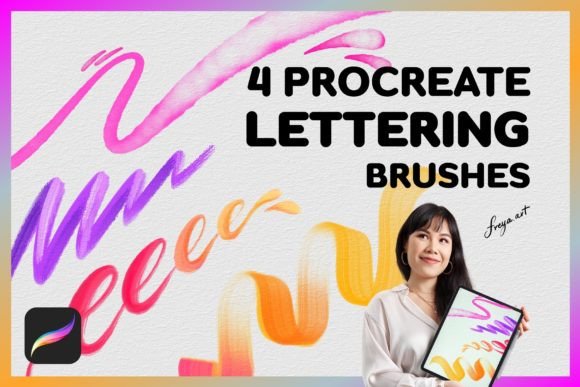
Elevating Digital Lettering with Specialized Procreate Script Brushes
The transition from traditional pen and paper to digital illustration has revolutionized the way artists approach hand lettering. For many creators, the iPad paired with the Procreate app has become the ultimate studio, offering portability without sacrificing power. However, the default tools often lack the nuanced character required for authentic script work. This is where specialized Procreate Script Brushes come into play, bridging the gap between rigid digital lines and organic, flowing handwriting. A curated set of four lettering brushes—comprising a Round Multi Line Brush, a Round Outline Brush, a Shadow Brush, and a Duo Color Brush—offers a comprehensive toolkit for designers looking to refine their typographic aesthetic.
The Mechanics of Authentic Digital Script
Creating convincing script on a tablet requires more than just steady hands; it demands tools that respond intuitively to human movement. The core functionality of high-quality Procreate Script Brushes lies in their pressure sensitivity settings. These brushes are engineered to work seamlessly with the Apple Pencil, relying heavily on the amount of pressure applied during each stroke. When you press harder, the line thickens; when you lighten your touch, it tapers elegantly. This dynamic response mimics the behavior of real-world nibs and brush pens, allowing for natural variation in line weight that is essential for professional-looking calligraphy.
It is crucial to note that these digital assets are exclusively designed for the Procreate ecosystem. They do not function in other software environments such as Adobe Photoshop or Clip Studio Paint. This specificity ensures that the brush engines are optimized for Procreate’s unique rendering capabilities, providing a smoother experience with less latency. For artists committed to the iPad workflow, this specialization means faster setup times and more predictable results, letting them focus entirely on the creative process rather than troubleshooting compatibility issues.
Breaking Down the Essential Toolkit
A versatile lettering workflow requires more than just a single pen tool. The included set of four distinct brushes addresses various stages of the design process, from initial sketching to final embellishment. Understanding the specific purpose of each tool helps maximize efficiency and artistic expression.
- Round Multi Line Brush: This tool is ideal for creating textured, sketched effects or adding depth to simple letters. By drawing multiple parallel lines in a single stroke, it adds visual interest and a hand-drawn feel that flat colors cannot achieve.
- Round Outline Brush: Perfect for creating clean, consistent borders around your lettering. Whether you are designing logos or social media graphics, this brush helps define shapes clearly, making text pop against busy backgrounds.
- Shadow Brush: Depth is what separates amateur lettering from professional design. This brush allows artists to quickly add drop shadows or 3D effects, giving words volume and presence on the digital canvas.
- Duo Color Brush: This innovative tool enables two-tone effects in a single swipe. It is particularly useful for creating gradient-like transitions or contrasting highlights without needing complex layer masks or blending modes.
In addition to these primary tools, the inclusion of a bonus paper texture provides an immediate way to ground digital artwork in a tactile reality. Applying this texture over finished lettering can soften the harshness of pure digital pixels, making the final piece feel more like a scanned illustration from a sketchbook.
Integrating Brushes into Modern Design Workflows
Modern content creation moves at a rapid pace. Social media managers, freelance illustrators, and small business owners often need to produce high-quality visual assets quickly. Using pre-configured Procreate Script Brushes significantly accelerates this process. Instead of spending hours adjusting opacity, flow, and stabilization settings for every new project, artists can jump straight into creation. The instant download nature of these digital products means that once purchased, the tools are available immediately, allowing for spontaneous creativity.
Consider the workflow of a wedding invitation designer. Using the Round Outline Brush, they can create elegant monograms. The Shadow Brush then adds a subtle lift, ensuring the text stands out on textured cardstock mockups. Finally, the Duo Color Brush can be used to add a metallic sheen effect to key words, simulating foil stamping without the cost of physical printing tests. This level of versatility makes the brush set valuable not just for hobbyists, but for professionals who need reliable tools for client work.
Optimizing Your Setup for Best Results
To get the most out of these tools, hardware choices matter. While the brushes are sophisticated, they rely on the precision input of the Apple Pencil. Finger painting, while possible in Procreate, does not offer the same degree of pressure variance needed for true script dynamics. Artists should ensure their iPad screen is clean and consider using a matte screen protector if they prefer the friction of paper over glass. This tactile feedback can improve control, especially when executing fine details with the Round Multi Line Brush.
Furthermore, understanding layer management is key. Since these brushes often involve transparency and blending, organizing your workspace efficiently will prevent clutter. It is recommended to keep outline layers separate from shadow layers. This non-destructive approach allows for easy adjustments later in the process. If a shadow looks too heavy, it can be toned down independently without affecting the crispness of the main lettering.
Why Specialized Tools Matter for Skill Development
There is a common misconception that using specialized brushes is a shortcut that bypasses skill acquisition. In reality, the right tools can accelerate learning by providing immediate visual feedback. When a beginner uses a standard round brush, they may struggle to achieve consistent tapering. With a dedicated script brush, the software assists in creating those natural starts and ends to strokes. This allows the learner to focus on muscle memory, spacing, and composition rather than fighting against the tool’s limitations.
Moreover, experimenting with different brush types encourages artistic growth. The Duo Color Brush, for instance, might inspire a designer to explore color theory in ways they hadn’t considered before. The Shadow Brush invites experimentation with lighting and perspective. By having a diverse set of tools at their disposal, artists are pushed to try new techniques, leading to a more robust and adaptable portfolio.
Practical Considerations Before Purchasing
Before integrating new digital assets into your library, it is wise to consider your current project needs. If your work primarily involves geometric sans-serif typography, script brushes may see limited use. However, if your style leans towards organic, hand-lettered, or vintage aesthetics, these tools are indispensable. Additionally, verify that your device meets the requirements for running the latest version of Procreate, as older models may experience lag with complex brush engines.
Another factor is the learning curve associated with new tools. While these brushes are designed for ease of use, mastering the pressure sensitivity takes practice. Beginners should dedicate time to simple drills, such as drawing continuous loops and waves, to build confidence. Over time, the connection between hand movement and digital output becomes second nature, allowing for fluid and expressive lettering.
Ultimately, investing in high-quality Procreate Script Brushes is an investment in your creative identity. They provide the technical foundation needed to express unique stylistic voices, whether for personal joy or professional gain. With the ability to instantly download and start creating, there is no barrier to entry other than the desire to create. By combining these specialized tools with the power of the iPad and Apple Pencil, artists can unlock new levels of precision and beauty in their digital lettering journey.