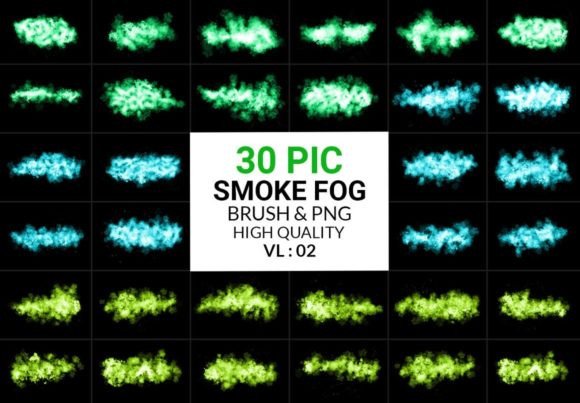
Elevate Designs with Fog Brushes PNG
Atmosphere is often the missing ingredient in digital art that feels flat or disconnected from its subject. Whether you are composing a moody landscape, designing a cinematic movie poster, or adding depth to a product mockup, the presence of mist, smoke, or fog can transform a static image into an immersive experience. This is where Fog Brushes Png for Photoshop become an indispensable tool in your creative arsenal. Rather than spending hours manually painting semi-transparent layers or searching for stock photos that never quite fit the lighting, this curated set of 30 high-definition assets allows you to introduce realistic atmospheric effects instantly.
The value of this pack lies not just in convenience, but in quality and versatility. Each element is crafted to mimic the organic, unpredictable nature of real smoke and fog. With a resolution of 3000 pixels, these assets maintain their clarity even when scaled for large-format prints or high-resolution digital displays. For designers who demand precision, the promise of "no blur, no green pixel, no noise" ensures that every integration looks professional and seamless. Let us explore how you can leverage these tools to enhance your workflow and elevate your visual storytelling.
The Power of Realistic Texture
Digital design often suffers from being too clean. Vector lines are perfect, and colors are solid. However, the real world is messy, textured, and filled with particulate matter that interacts with light. Incorporating naturally shaped smoke brushes bridges the gap between the digital and the physical. When you use these PNGs, you are not just adding a gray overlay; you are adding volume, depth, and a sense of airiness to your composition.
What makes this specific collection interesting is its dual format. You receive both Photoshop brushes and standalone transparent PNGs. The brushes allow for dynamic, custom creation where you can paint fog exactly where you need it, controlling density and flow with your stylus pressure. The PNGs, on the other hand, offer pre-composed shapes that are perfect for quick placement. This flexibility means you can use them exclusively for distinct clouds of smoke or stack them on top of one another to build complex, layered atmospheric scenes. The ability to layer these elements gives you control over the opacity and blending modes, allowing the fog to interact naturally with the background colors and lighting of your project.
Creative Applications Across Industries
The utility of Fog Brushes Png for Photoshop extends far beyond traditional digital painting. Different professionals can adapt these assets to meet specific client needs and audience expectations.
- Graphic Designers and Marketers: Use subtle fog layers to create negative space in advertisements. By softening the background with mist, you draw the viewer’s eye directly to the product or call-to-action text. It adds a premium, ethereal quality to luxury branding or tech product launches.
- Photographers and Photo Manipulators: Enhance portrait photography by adding foreground fog to create depth of field. This technique separates the subject from the background, making the person pop while adding a mysterious or romantic narrative to the image.
- Game Developers and Concept Artists: Quickly block out environments. Instead of rendering complex particle systems in early stages, use these high-quality PNGs to visualize mood and lighting in concept art, helping stakeholders understand the intended atmosphere of a game level.
- Social Media Content Creators: Stand out in crowded feeds by adding dramatic weather effects to static posts. A simple landscape photo can become a viral-worthy piece of art with the addition of rolling mist or swirling smoke.
Techniques for Seamless Integration
To ensure your results remain clear, effective, and professional, it is essential to approach these assets with intention. Simply dropping a smoke PNG onto a canvas rarely yields the best result. Here are practical recommendations for integrating these elements effectively.
First, consider your blending modes. While "Normal" mode works for opaque objects, fog and smoke interact with light. Experiment with Screen, Lighten, or Overlay modes to allow the underlying colors to show through the white or gray tones of the smoke. This creates a more natural integration where the fog appears to be part of the scene rather than sitting on top of it.
Second, pay attention to direction and flow. Real fog moves with the wind. If your lighting suggests a breeze from the left, ensure your smoke trails follow that same trajectory. You can use the warp or transform tools in Photoshop to adjust the shape of the PNGs to match the environmental cues in your artwork. Consistency in direction helps maintain the illusion of reality.
Third, use color grading. Fog is rarely pure white or gray; it takes on the ambient light of its surroundings. If your scene is lit by a sunset, apply a warm orange or pink hue to your fog layer. If it is a cold, moonlit night, shift the tones toward blue or purple. This step is crucial for keeping the result consistent and audience-friendly, as it prevents the asset from looking like a generic sticker.
Maximizing Efficiency Without Sacrificing Quality
One of the primary benefits of using a pre-made pack like this is speed. Creating professional graphic effects in seconds allows you to iterate faster. You can test multiple atmospheric conditions without committing hours to manual painting. This efficiency is particularly valuable for freelancers and small business owners who need to deliver high-quality work under tight deadlines.
However, speed should not lead to repetition. To keep your work original, avoid using the same brush stroke or PNG shape in every project. Mix and match different elements from the 30-piece set. Combine a dense, heavy smoke PNG with a lighter, wispy brush stroke to create variation in texture. The unique pack structure ensures you have enough variety to keep your designs fresh. Because the files are high-definition and free from noise or artifacts, you can crop and zoom in on specific sections of a single PNG to create entirely new shapes, effectively multiplying the utility of the pack.
For educators and hobbyists, this set serves as an excellent learning tool. By studying how these pre-made fog shapes interact with light and shadow, you can improve your understanding of atmospheric perspective. Try recreating the effects manually after using the brushes to understand the underlying principles of volume and transparency.
Final Thoughts on Atmospheric Design
Incorporating Fog Brushes Png for Photoshop into your workflow is about more than just adding effects; it is about enhancing the emotional resonance of your work. Atmosphere dictates mood. A clear sky feels open and optimistic, while a foggy forest feels mysterious and introspective. By mastering these tools, you gain the ability to guide your audience’s emotional response through visual cues.
Whether you are building a brand identity, illustrating a fantasy novel cover, or editing personal photos, these 30 high-quality assets provide the foundation for sophisticated design. Remember to experiment with layering, adjust colors to match your lighting, and use the transparency to your advantage. With these practical approaches, you can transform ordinary images into compelling visual narratives that captivate and inspire.