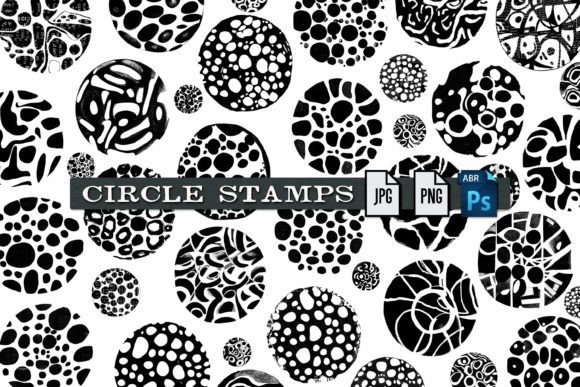
Circle Stamp Brushes and Graphics Guide
In the vast ecosystem of digital design assets, simplicity often holds the most power. Circle Stamp Brushes and Graphics represents a curated collection designed to streamline the creative process for artists, designers, and content creators who value efficiency without sacrificing aesthetic quality. This resource is not merely a folder of images; it is a multifaceted toolkit that bridges the gap between static imagery and dynamic application. By understanding what this package offers and how its components function, users can determine if it aligns with their specific workflow, whether they are crafting social media graphics, designing educational materials, or producing professional branding elements.
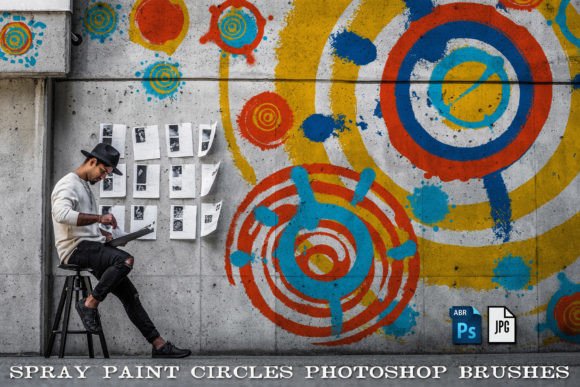
At its core, this set comprises 34 distinct circle designs. However, the value lies in the versatility of the file formats provided. Each graphic is available as a high-quality JPG, suitable for quick previews or standard web use where transparency is not required. More importantly, every graphic is also provided in transparent PNG format. This distinction is crucial for layering designs over complex backgrounds, photographs, or colored textures without unsightly white boxes appearing around the edges. Furthermore, all 34 graphics are compiled into a single Photoshop Brush file (.abr). This integration allows for rapid, repetitive application with customizable spacing, size, and opacity, transforming a static image into a dynamic drawing tool. As an added bonus, the inclusion of a seamless tiling pattern extends the utility of the circles beyond individual stamps, enabling users to create infinite backgrounds or textured fills.
Why Format Flexibility Matters to Different Creators
The decision to include JPGs, PNGs, and .abr files addresses the varied technical needs of different user groups. For a beginner or a hobbyist who may not yet be comfortable navigating Adobe Photoshop’s brush engine, the standalone PNG files offer an immediate, drag-and-drop solution. These users can import the circles into Canva, Microsoft Word, or free alternatives like GIMP with minimal friction. The priority here is ease of use and immediate visual impact. They do not need to learn how to install brushes; they simply need a clean, circular element to frame a photo or highlight text.
Conversely, professional graphic designers and digital illustrators will likely gravitate toward the .abr file. For these users, speed and non-destructive editing are paramount. A brush allows them to paint a series of circles along a path, vary the pressure sensitivity for organic looks, or scatter them randomly to create texture. The ability to adjust the brush dynamics means one asset can generate hundreds of unique variations. This flexibility supports a workflow where iteration is key, allowing professionals to experiment with composition rapidly before committing to final placement.
Practical Applications Across Industries
Understanding how Circle Stamp Brushes and Graphics fits into real-world projects helps potential users evaluate its relevance. Consider the following scenarios:
- Social Media Managers and Bloggers: Visual consistency is vital for brand recognition. A blogger might use the transparent PNGs to create uniform bullet points or to frame product shots in Instagram stories. The seamless tiling pattern can serve as a subtle background for quote cards, ensuring that the text remains legible while adding visual interest.
- Educators and Instructional Designers: Clarity is essential in educational materials. Teachers creating worksheets or digital presentations can use the simple circle shapes to highlight key terms, create multiple-choice bubbles, or organize information into digestible chunks. The JPG format is often sufficient for printed handouts, reducing file size and ensuring compatibility with older printers.
- Small Business Owners and Entrepreneurs: For those managing their own marketing, time is a scarce resource. The brush file allows for quick creation of decorative borders or dividers in email newsletters. Instead of hiring a designer for minor adjustments, a business owner can tweak the size and color of the circles to match seasonal promotions, maintaining a professional look with minimal effort.
- Digital Artists and Hobbyists: Creative experimentation drives this group. An artist might use the circles as a base for mandala designs, combining the stamp tool with rotation and blending modes. The seamless pattern can be used as a texture overlay in digital paintings, adding depth and complexity to flat colors.
Evaluating Quality and Long-Term Usefulness
When assessing any digital asset, longevity and adaptability are critical factors. The inclusion of both raster formats (JPG/PNG) and a proprietary brush format (.abr) ensures that Circle Stamp Brushes and Graphics remains useful even as software trends shift. While vector formats are often praised for scalability, high-resolution PNGs and well-configured brushes remain industry standards for many workflows, particularly in web design and digital illustration where pixel-perfect control is necessary.
The seamless tiling pattern adds significant long-term value. Patterns are notoriously difficult to create from scratch, requiring precise alignment and repetition testing. By providing a pre-made seamless tile, this package saves users hours of technical troubleshooting. This feature is particularly beneficial for web developers looking for lightweight background textures or print-on-demand sellers creating fabric designs. The ability to scale the pattern without visible seams enhances the professional finish of any project.
Matching the Tool to Your Goals
To determine if this set is right for you, consider your primary design challenges. If you struggle with consistency in your visual elements, the predefined nature of the 34 circles offers a ready-made style guide. If you find yourself repeatedly drawing similar shapes, the brush file automates that tedious task. If you need versatile assets that work across multiple platforms—from print to web to mobile apps—the combination of JPG and PNG formats provides the necessary compatibility.
It is also worth noting the learning curve associated with each component. The PNGs require zero technical skill, making them accessible to anyone with basic computer literacy. The .abr file requires Adobe Photoshop or compatible software, demanding a moderate level of technical proficiency. However, numerous tutorials exist online for installing and using custom brushes, making this a valuable opportunity for beginners to expand their software skills. The investment in learning how to use the brush file pays dividends in increased speed and creative freedom for future projects.
Final Thoughts on Versatility
Circle Stamp Brushes and Graphics exemplifies how a focused, well-structured asset pack can serve a wide array of creative needs. It respects the time constraints of professionals while remaining accessible to novices. By offering multiple formats and a bonus pattern, it acknowledges that modern design is rarely linear; it involves jumping between tools, platforms, and output methods. Whether you are looking to enhance a personal blog, streamline a corporate presentation, or add texture to a digital painting, this collection provides the foundational elements needed to achieve a polished result. The key is to recognize which format best suits your current project and to leverage the flexibility offered by the set to maintain both efficiency and creativity in your work.