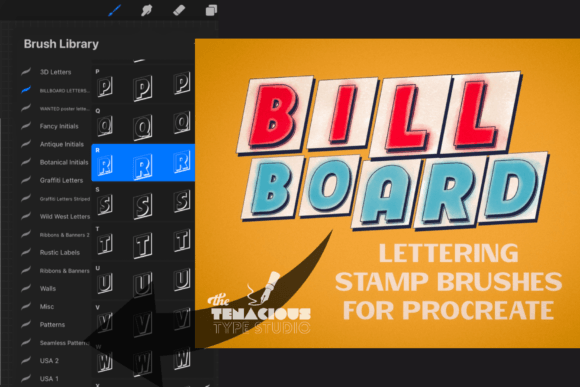
Billboard Sign Lettering Stamp Brushes: A Practical Review for Procreate Users
Digital lettering has evolved significantly with the introduction of specialized tools that bridge the gap between traditional sign painting and modern graphic design. Among these tools, Billboard Sign Lettering Stamp Brushes have emerged as a niche but valuable resource for artists working within the Procreate ecosystem. This specific brush set is designed to replicate the bold, blocky aesthetic of vintage marquee and billboard typography, offering a streamlined workflow for users who need high-impact text without the time investment of manual vector creation or complex hand-lettering.
For designers, illustrators, and hobbyists evaluating digital assets, understanding the functionality and limitations of this tool is essential. This article explores what the Billboard Sign Lettering Stamp Brushes offer, who benefits most from their use, and how they fit into a broader digital art workflow.
Understanding the Toolset
The core of this product is a specialized brush set compatible exclusively with Procreate 5. Unlike standard text tools that rely on font files, these brushes function as stamps. The set includes 26 individual stamps, representing each letter of the alphabet from A to Z. Each stamp is pre-oriented to the screen, meaning the letters appear upright regardless of the canvas rotation, which simplifies the placement process.
A distinguishing feature of these brushes is the integration of variable pressure sensitivity. While traditional stamps are static images, these brushes respond to input pressure, allowing for subtle variations in stroke weight or opacity depending on how hard the user presses with the Apple Pencil. This adds a layer of organic feel to what would otherwise be rigid, geometric shapes. The aesthetic is distinctly decorative, focusing on "billboard" or "marquee" style block letters that evoke mid-century advertising and cinema signage.
Why Artists Choose Stamp-Based Lettering
The primary appeal of Billboard Sign Lettering Stamp Brushes lies in efficiency and consistency. Hand-lettering complex block fonts can be time-consuming, requiring precise alignment and uniform spacing. For projects with tight deadlines, such as seasonal social media graphics or quick craft designs, using pre-made stamps can reduce production time significantly.
Furthermore, these brushes offer a specific stylistic consistency that can be difficult to achieve manually. The blocky, high-contrast nature of billboard lettering requires steady hands and a good eye for geometry. By using stamps, artists ensure that every letter maintains the same structural integrity, resulting in a polished, professional look even for those who may not specialize in typography.
Benefits and Practical Applications
There are several scenarios where this toolset proves particularly useful. Crafters and small business owners often need to create mockups for physical products, such as t-shirts, mugs, or signage. The bold nature of these letters translates well to print-on-demand services where clarity and visibility are paramount. Additionally, the decorative quality makes them suitable for special occasion projects, such as birthday cards, event invitations, or holiday-themed digital art.
- Speed: Rapidly assemble words and phrases without drawing each character from scratch.
- Style Specificity: Instantly achieve a vintage, retro, or industrial aesthetic that aligns with current design trends.
- Ease of Use: Low barrier to entry for beginners who want to incorporate typography into their illustrations without mastering font design.
- Customization: Since the output is raster-based within Procreate, users can easily recolor, add textures, or apply effects to the letters after stamping.
Tradeoffs and Limitations
While convenient, relying on stamp brushes comes with inherent tradeoffs. The most significant limitation is flexibility. With only 26 uppercase letters included, users are restricted to all-caps compositions. There are no lowercase letters, numbers, or punctuation marks included in the base set. This restricts the tool’s utility for longer sentences or formal text layouts where mixed case is necessary for readability.
Another consideration is resolution and scalability. As raster brushes, the quality of the stamped letters depends on the canvas size and resolution at the time of creation. If a user needs to scale a design up significantly for large-format printing, they must ensure the initial canvas is set to a high enough DPI to prevent pixelation. Unlike vector-based text, these stamps cannot be infinitely scaled without potential quality loss.
Additionally, the exclusive compatibility with Procreate 5 means that users of other digital art software, such as Adobe Fresco, Clip Studio Paint, or Photoshop, cannot utilize this specific asset. This locks the user into a specific hardware and software ecosystem, primarily iPad users.
Decision-Making Insights: Is This Right for You?
When evaluating whether to integrate Billboard Sign Lettering Stamp Brushes into your workflow, consider your typical project requirements. If your work frequently involves short, punchy headlines, logos, or decorative titles where an all-caps, bold aesthetic is appropriate, this tool is a strong fit. It is particularly valuable for artists who struggle with consistent letter spacing or geometric precision.
However, if your projects require nuanced typography, such as body text, mixed-case headings, or highly customized ligatures, this tool may fall short. In such cases, investing in high-quality font files or learning advanced vector lettering techniques might be a more sustainable long-term solution. Font files offer greater flexibility in terms of kerning, tracking, and stylistic alternates, which stamp brushes cannot replicate.
Alternatives to Consider
For those who find the limitations of stamp brushes too restrictive, several alternatives exist. Vector graphic software like Adobe Illustrator provides ultimate control over letterforms, allowing for precise manipulation of anchor points and curves. For Procreate users who prefer hand-drawn authenticity but want more flexibility than stamps offer, practicing with standard monoline or calligraphy brushes can develop a unique personal style that stands out more than pre-made assets.
Additionally, there are other brush sets available that include full alphabets with both upper and lowercase letters, as well as numbers and symbols. While these may lack the specific "billboard" aesthetic, they offer greater versatility for general-purpose lettering tasks.
Final Thoughts
The Billboard Sign Lettering Stamp Brushes serve a specific purpose in the digital artist’s toolkit. They are not a replacement for comprehensive typography skills but rather a specialized shortcut for achieving a distinct visual style efficiently. By understanding the balance between speed and flexibility, users can determine if this tool aligns with their creative goals. For seasonal projects, crafting, and bold graphic statements, these brushes offer a practical and effective solution. However, for complex typographic needs, they should be viewed as a supplementary asset rather than a primary text tool.